Why File Systems Failed Before DBMS: Complete Beginner Guide to Data Management Evolution (2026)
A complete beginner guide explaining file systems, their limitations, and how Database Management Systems (DBMS) solve real-world data problems like redundancy, inconsistency, and concurrency.
(Beginner-Friendly Guide with Examples, Diagrams, FAQs & Viva Questions)
Written by CoreDeploy Foundation Team.
Published: Mar 27, 2026 • 10 min read
Without a Database Management System (DBMS), modern applications like banking systems, e-commerce platforms, and social media would struggle with data inconsistency, security issues, and system failures.
This guide explains why file systems failed and how DBMS became essential. You’ll learn core problems likedata redundancy, lack of atomicity, poor security, and concurrencyissues—along with simple explanations, real-world examples, and visual diagrams designed for beginners.
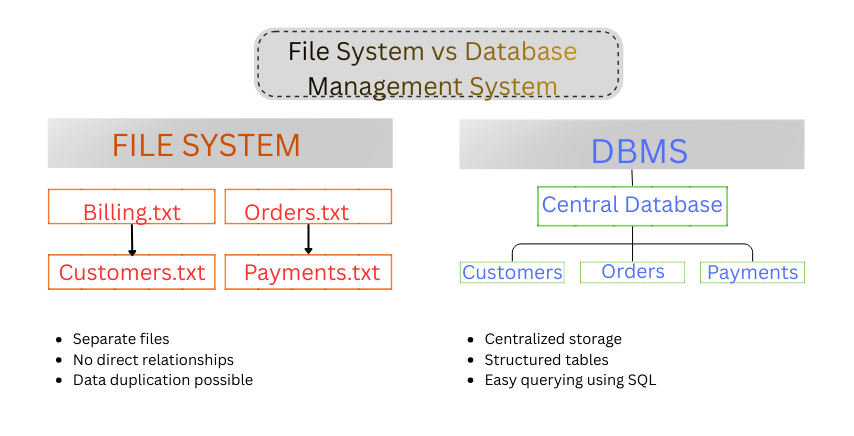
File System vs DBMS: Separate files vs centralized database structure
In the early days of computing, data was stored using simple files—.txt, .csv, or custom binary formats. There were no relational databases, no SQL, and no structured query systems.
If you’re learning about a file system in
Operating System, or wondering why modern applications don’t rely on flat files anymore, you’re asking an important foundational question.
"A file system in computer architecture is well-suited for storing raw data such as images, videos, and documents." But when it comes to managing complex real-world data in a structured manner and frequently changing data, file systems quickly become inefficient and error-prone.
As someone working with backend systems and data-driven applications, I’ve seen firsthand how poor data handling in file systems leads to real-world production failures—from data loss and inconsistencies to total system crashes. While modern banking and e-commerce platforms now depend on databases for reliability, the risks of old-school file storage are very real.
"Early in my career, I spent 48 hours manually cleaning a dataset because a file-based system allowed 'User A' to update a client's email while 'User B' was still using the old one. This created a massive "Data Inconsistency" mess that cost the company thousands in missed communications. Experiences like that are exactly why understanding the transition from File Systems to DBMS is the most important foundational step for any aspiring developer or architect."
1. Understanding the Hierarchy: How Your Computer Actually Organizes Data
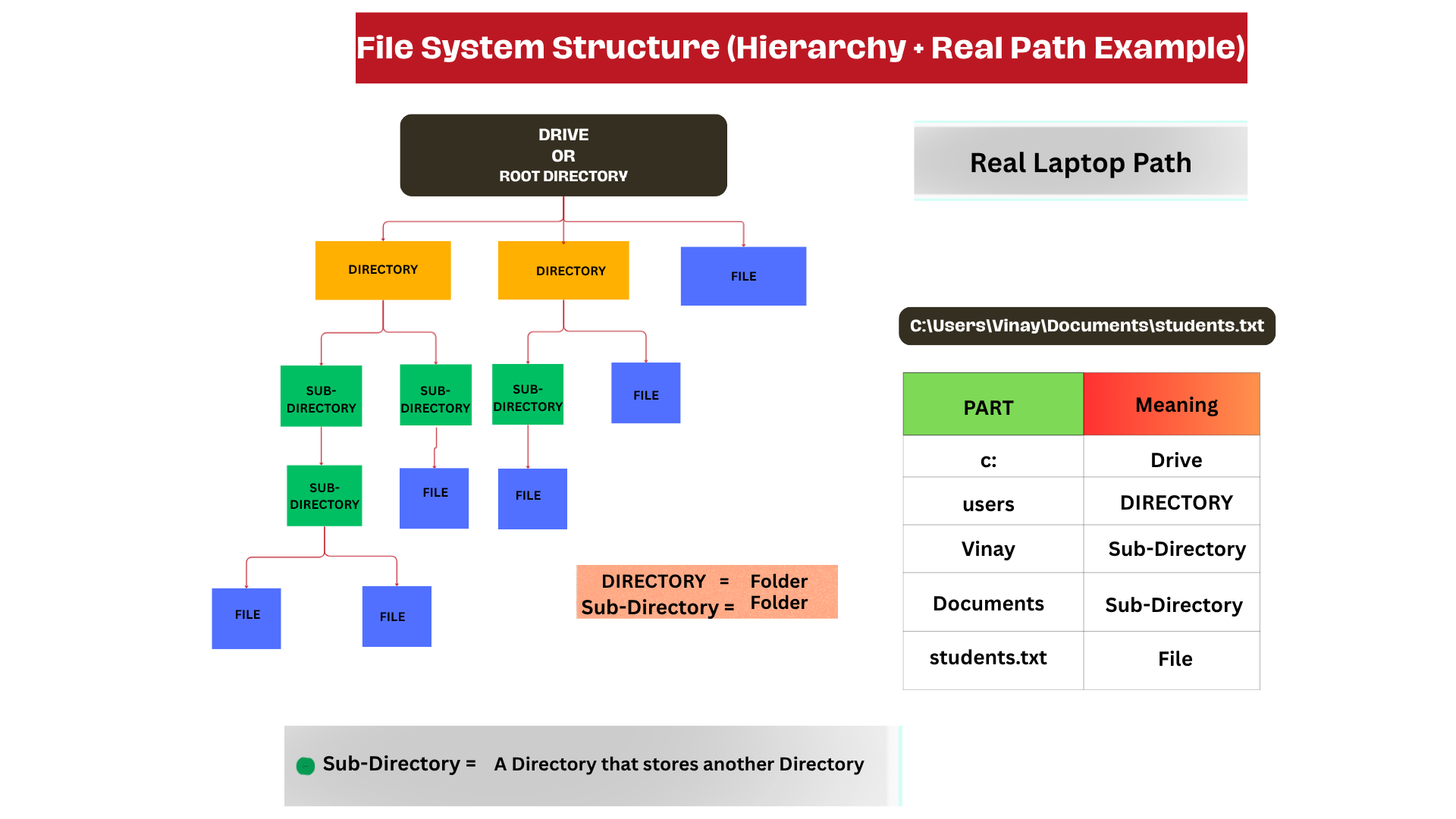
File System Structure: Hierarchy and Real Path Example
Before we dive into the limitations and drawbacks of traditional file systems, we need to take a step back and look at the "skeleton" of your computer. How does your OS actually keep track of that one specific PDF or image among millions of others?
It all comes down to a Hierarchical Structure. Think of it like a massive tree: it starts at a single point (the roots) and branches out into endless possibilities.
The Anatomy of a File Path
To understand the hierarchy, let’s look at a "Real Laptop Path." When you see a string like
C:\Users\Vinay\Documents\students.txt,
you aren't just looking at text; you’re looking at a map.
The Root (The Drive): Everything starts at the Drive (C:). This is the foundation of the entire structure.
Directories (Folders): These are the primary branches. In our example, users is a main directory.
Sub-Directories: These are "folders within folders." As the image shows, Vinay and Documents are sub-directories.
The File: This is the leaf at the end of the branch. The file (like students.txt) is the actual container of data.
Pro Tip: In technical terms, there is no functional difference between a "Directory" and a "Sub-Directory".
Why Does This Structure Matter?
This hierarchy was designed for human logic—putting things inside other things. However, as we are about to explore, this "tree" method has some serious flaws when it comes to modern data management. Finding a file is easy if you know the exact "map," but what happens when the map gets too big, or you forget which branch you climbed?
Understanding this pathing logic is crucial because the very "folders" we rely on to stay organized are often the same things that create data silos and search-ability issues in traditional file systems.
In real-world applications, file systems store your PDFs locally, while
Computer Networks enable those files to be shared and accessed by others anywhere.
This is where platforms like WhatsApp and Gmail come in—making file storing and sharing simple, fast, and accessible to everyone.
2. Data Redundancy and Inconsistency (The Duplication Trap)
In early systems, different departments maintained separate files.
For example:
HR → Staff file
Payroll → Employee file
❌ The Problem
If an employee updates their address, one file may be updated while the other remains outdated.
Result
This leads to data inconsistency—multiple versions of truth.
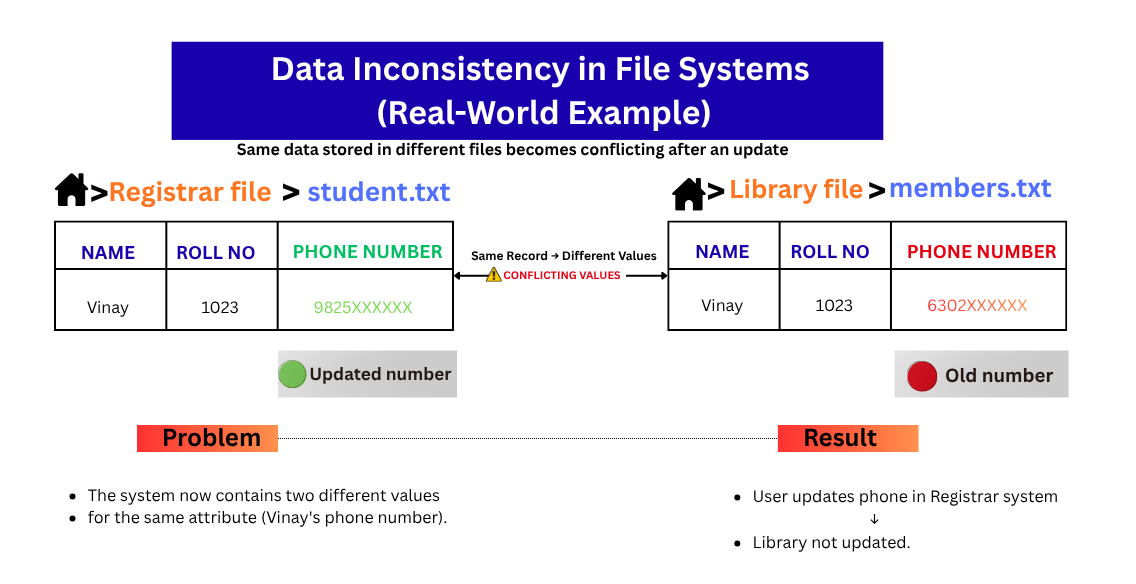
Data Inconsistency Example: Same data stored in different files leads to conflicting values
"I saw many students get confused during exams and the viva due to tension and pressure, and they often struggle to distinguish between Data redundancy and Data inconsistency. Actually, they know, even though they get confused, these small things decide your marks."
But don’t worry. Instead of explaining, I will give you a simple trick to remember it quickly.
1. Data Redundancy (The "Duplicate" Problem)
Imagine a student named Rahul.
The Registrar's Office has a file with Rahul's Name, Roll No, Phone Number, and Home Address.
The Library also keeps a file with Rahul's Name, Roll No, Phone Number, and Home Address (just in case they need to call him about a late book).
Redundancy is the situation in which the same phone number and address are typed and saved in two different places. It’s like having two identical physical folders in two different buildings. It wastes storage space and, more importantly, wastes the time of whoever has to type it all in twice.
Memory Trick: Redundancy = Repeat. (The same data is just repeated everywhere.)
2. Data Inconsistency (The "Conflict" Problem)
Now, imagine Rahul gets a new phone number. He’s a responsible student, so he goes to the Registrar's office to update his details. The Registrar changes it in their file. However, Rahul forgets that the Library also has his number on file.
Inconsistency happens when the system gives you two different answers to the same question: "What is Rahul’s phone number?" Now the data is untrustworthy. If the Librarian tries to call him, they’ll reach a dead number.
Memory Trick: Inconsistency = Conflict. ("The different versions of the data are fighting each other")
✅ Simple Meaning
Data redundancy = Same data stored in multiple places
Data inconsistency = Different values for the same data
✔ DBMS Solution
DBMS uses normalization (organizing data into related tables) to reduce duplication.
3. Lack of Atomic Transactions (Half-Done Operations)
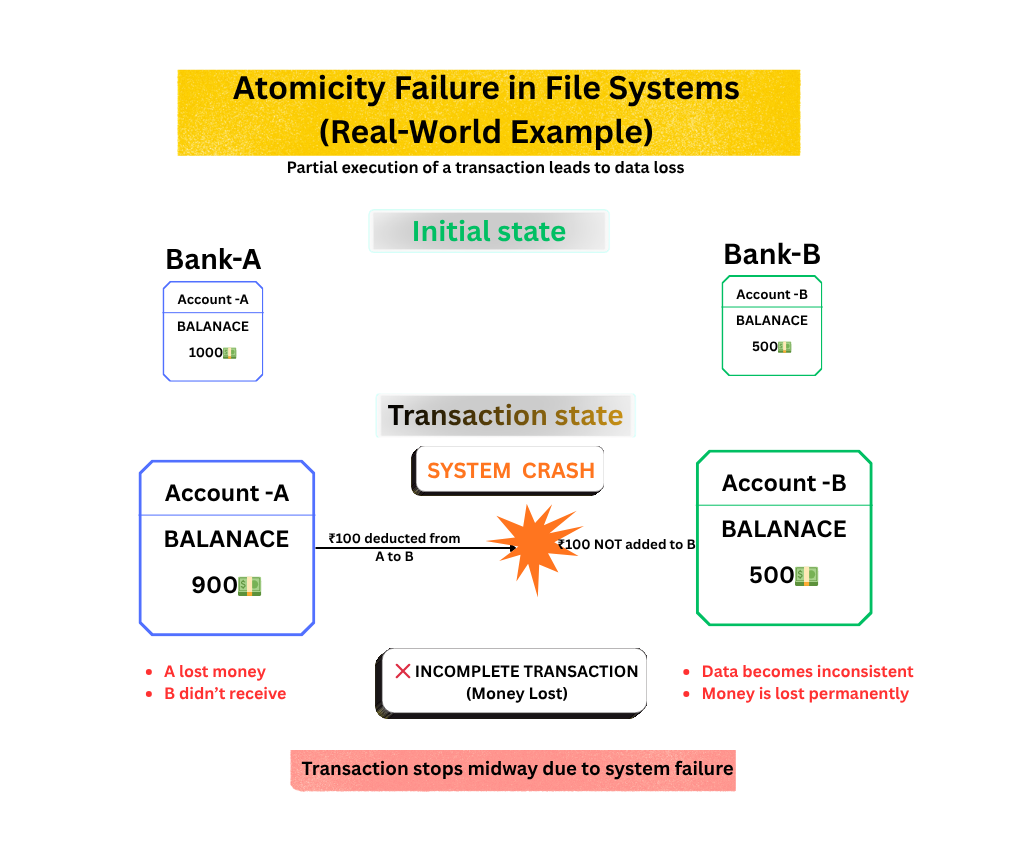
Atomicity Failure Example: Partial transaction leads to data inconsistency and loss
Imagine transferring money between accounts using a file system.
❌ The Problem
Money is deducted from Account A
System crashes before adding to Account B
Result
Money is lost.
✅ Simple Meaning
Atomicity = Either everything happens, or nothing happens
In the next section, we will explore how ACID properties transformed DBMS into an upgraded version of file systems. They guarantee data integrity.
4. Difficulty in Accessing Data (The Coding Burden)
In a file system, you cannot directly query data.
❌ The Problem
To find:
“Customers who spent > ₹500 in March”
You must:
Write code (Python/Java/C++)
Manually scan files
Filter data
Result
Time-consuming
Error-prone
Hard to maintain
✅ Simple Meaning
Data dependence = Your program depends heavily on the file format
✔ DBMS Solution
Use SQL:
</>SQL
SELECT * FROMcustomersWHEREspending > 500;
👉 You ask WHAT you want, not HOW to get it
5. Integrity and Security Limitations
In a typical operating system environment, whether you're using a file system in Windows or a file system in Linux, the security controls are usually broad and applied at the level of the entire file or folder.
❌ The Problem (File-level limitation)
You cannot:
Hide salary column
Allow access only to names
Result
Poor security and data leaks
✔ DBMS Solution
Databases provide:
Row-level security
Column-level access control
6. Concurrency Issues (Lost Updates Problem)
When multiple users access the same file:
❌ The Problem
Two users edit the same file
One overwrites the other
Result
Data loss (called the Lost Update Problem)
✅ Simple Meaning
Concurrency = Multiple users accessing data at the same time
✔ DBMS Solution
Databases handle:
Locking
Isolation levels
Prevent race conditions & dirty reads
Login sessions
7. Lack of Data Independence (Tight Coupling Problem)
❌ The Problem
In a file system, if you change the structure of a file (like adding a new field), all the programs using that file must also be changed.
Result
This creates tight coupling between data and code, making the system hard to maintain and update.
✅ Simple Meaning
Data independence = You can change data structure without changing the program
✔ DBMS Solution
DBMS provides logical & physical data independence, so changes don’t break applications.
8. No Indexing (Slow Searching)
❌ The Problem
File systems scan data line-by-line to find information.
Result
Slow performance for large data.
✔ DBMS Solution (1 line)
DBMS uses indexing to quickly locate data without scanning the entire dataset.
📊 File System vs DBMS (Quick Comparison)
Feature
File System
DBMS
Data Redundancy
High
Low (Normalized)
Data Access
Requires coding
Easy (SQL queries)
Security
File-level only
Row & column level
Data Integrity
Weak
Strong constraints
Backup & Recovery
Manual
Automated
Concurrency
Limited
High multi-user support
Transactions
Not supported
ACID properties
Scalability
Poor
Highly scalable
The "Comeback": Why File Systems Are Still Essential in 2026
If file systems have so many drawbacks, why didn't we just delete them and use databases for everything?
The truth is, file systems aren't "failed" technology—they are just specialized tools. In fact, in this 2026 AI-driven era, file systems are seeing a massive resurgence. Databases are great for relationships, but file systems are highly efficient for raw performance and simplicity.
⚡ Top 3 Advantages of File Systems
Lower Overhead & Speed: A DBMS is a heavy "middle-man." It needs memory to run its engine, query optimizer, and security layers. A file system is "bare metal"—it’s just the OS talking directly to the disk. For simple read/write tasks, it’s significantly faster.
Unstructured Data King: Databases hate "Blobs" (Binary Large Objects) like 4K videos or high-res RAW photos. If you try to store a 2GB movie inside a SQL table, your database will crawl to a halt. File systems handle these massive chunks of data effortlessly.
No Cost & No Setup: You don't need to install a server, manage a schema, or pay for a license to save a .txt file. It works out of the box on every device on Earth.
🌍 Who is still using File Systems in 2026?
You might be surprised to learn that some of the world’s most advanced tech still relies on basic file structures rather than a DBMS.
Who?
Use Case
Why not a DBMS?
AI Engineers
Training Large Language Models (LLMs)
AI models need to ingest trillions of raw text files and images. Putting these in a database would add a "tax" of extra processing time they can't afford.
Video Editors/Netflix
8K Video Streaming
Streaming a movie requires sequential "bitrate" speed. File systems allow the player to grab the next chunk of video instantly.
System Architects
Configuration & Logs
Your computer’s settings (.yaml, .json, .conf) are stored as files so they can be read even if the database is down or hasn't started yet.
Gaming Studios
Asset Management
When you play an open-world game, the 3D textures and sounds are pulled directly from the file system to ensure zero lag during gameplay.
💡 The Modern Reality
In 2026, we don't choose one over the other. We use Hybrid Architectures.
The DBMS stores the metadata (User name, price, date).
The File System stores the actual content (Profile picture, product video).
The takeaway for your exam: Don't say "File systems are old." Say "File systems are for unstructured, heavy data, while DBMS is for structured, relational data."
🔎 People Also Search For (The Beginner’s Confusion Solved)
A file system is the foundation of your computer. You cannot install a DBMS without a file system to hold the database software itself. Think of the File System as the "Ground" and the DBMS as a "High-Rise Building." You need the ground to build the skyscraper, but you live in the skyscraper for better organization.
This is the #1 viva question!
Redundancy is about Storage: You have the same info in two places (Waste of space).
Inconsistency is about Accuracy: The info in those two places doesn't match anymore (Conflict of truth).
Redundancy usually leads to Inconsistency.
Technically, yes, but practically, no. If two users try to sign up at the same millisecond, a file system will likely corrupt your "users.txt" file. A DBMS is built to handle thousands of people at once; a file system is built for one OS at a time.
However, for a single user or very small applications, a file system is more than enough. It works fine until the application grows in size, complexity, or number of users—at that point, a DBMS becomes necessary.
In 2026, yes. "Directory" is the technical term used in Computer Architecture and CLI (Command Line), while "Folder" is the user-friendly term used in GUI (Graphical User Interface) like Windows Explorer.
Yes. Windows uses Drive Letters (C:, D:), whereas Linux uses a Single Root (/). In Linux, even your hardware (like a Pendrive) is treated as a file within that single tree structure.
DBMS is preferred because it provides data consistency, security, concurrency control, and efficient querying, which file systems cannot handle effectively.
DBMS allows fine-grained access control like row-level and column-level security, whereas file systems usually provide only file-level permissions.
The biggest limitation is lack of data consistency and concurrency control, which leads to data duplication, conflicts, and potential data loss.
Normalization is the process of organizing data into tables to reduce redundancy and improve data integrity.
File systems are used to store unstructured data like images, videos, and logs, while DBMS manages structured data like user details and transactions.
🎯 Final Thoughts: The Hybrid Reality
We’ve come a long way from the early days of storing everything in .txt files. While the limitations of traditional file systems—like redundancy, lack of atomicity, and security gaps—made the invention of DBMS a necessity, file systems haven't disappeared.
As we’ve explored, the "failure" of file systems was only in the context of complex, structured data. In our modern era:
File Systems manage the "Physical" (The bits, the bytes, and the raw 8K videos).
DBMS manages the "Logical" (The relationships, the security, and the meaning).
The Bottom Line for Students: If you are asked why DBMS is better, don't just say "it's faster." Explain that it provides Integrity (no half-done tasks), Consistency (one version of truth), and Concurrency (everyone can work at once).
🚀 What’s Next?
Understanding the "Why" is only half the battle. Now that you know why we moved to databases, let's look at How they work.
➡️ Related Guide: Why Databases Use Tables Instead of Files for Modern Storage