
Every millisecond the world generates enormous volumes of data—from online payments and banking transactions to movie recommendations and social media activity.
Without a Database Management System (DBMS), companies like Netflix could not recommend movies, and banking systems could not verify balances in real time.
This guide is the master blueprint for understanding how modern databases work. It explains the fundamental ideas behind DBMS, database architecture, schema design, query processing, metadata, and more—using simple explanations designed for beginners.
1. Why File Systems Failed Before Databases
Before modern databases existed, organizations stored information using flat file systems.
For example, a company might store data in separate spreadsheets or text files:
- Billing records
- Shipping records
- Customer support records
- Inventory records
At first this approach works, but as the system grows it leads to serious problems.
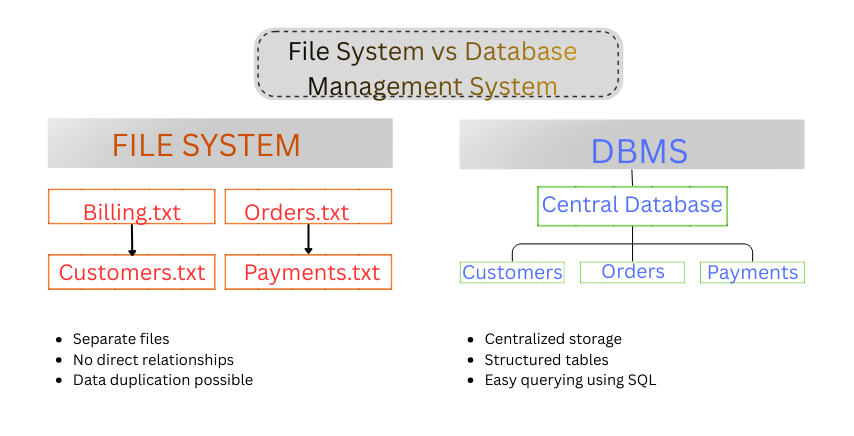
Before Database Management Systems were introduced, organizations relied on file-based storage. Different departments maintained their own files for customers, billing, and inventory, which led to data redundancy, inconsistent records, and difficult data retrieval. A DBMS solves these issues by storing information in a centralized database where applications can access consistent and structured data efficiently.
Data Redundancy
The same information appears in multiple files.
Example:
A customer's email address might exist in five different files. If the email changes, it must be updated everywhere.
Data Inconsistency
If one file updates the email and others do not, the system now contains conflicting information.
Data Isolation
Data is scattered across different files and formats. Retrieving information becomes difficult.
Instead of querying data, analysts must search through many independent files.
Because of these problems, organizations needed a better system to store and manage data.
That system became the Database Management System (DBMS).
If you want a deeper breakdown of these issues, read our detailed guide:
Deep Dive: Why File Systems Failed Before Databases: 5 Critical Reasons (Easy for Beginners to Understand)
2. What Is a DBMS?
Definition
A Database Management System (DBMS) is software that stores, organizes, manages, and retrieves data efficiently. It acts as an interface between users and databases, allowing applications to access data securely and quickly.
Examples of DBMS software include:
- MySQL
- PostgreSQL
- Oracle Database
- Microsoft SQL Server
- MongoDB
A Database Management System (DBMS) is software that allows users and applications to store, manage, retrieve, and organize data efficiently.
Instead of storing information in separate files, data is stored in a structured database.
A DBMS performs several important functions:
- organizes data into tables and structures
- allows users to query data using languages such as SQL
- controls access and security
- prevents duplicate or inconsistent data
- provides backup and recovery mechanisms
DBMS Internal Architecture
A Database Management System is built from several internal components that work together to process queries and manage stored data. This structure is known as the internal architecture of a DBMS.
When a user or application sends a SQL query, the database system processes the request through two major components: the Query Processor and the Storage Manager. These components analyze the query, determine the best execution strategy, and retrieve the required data from the physical database.
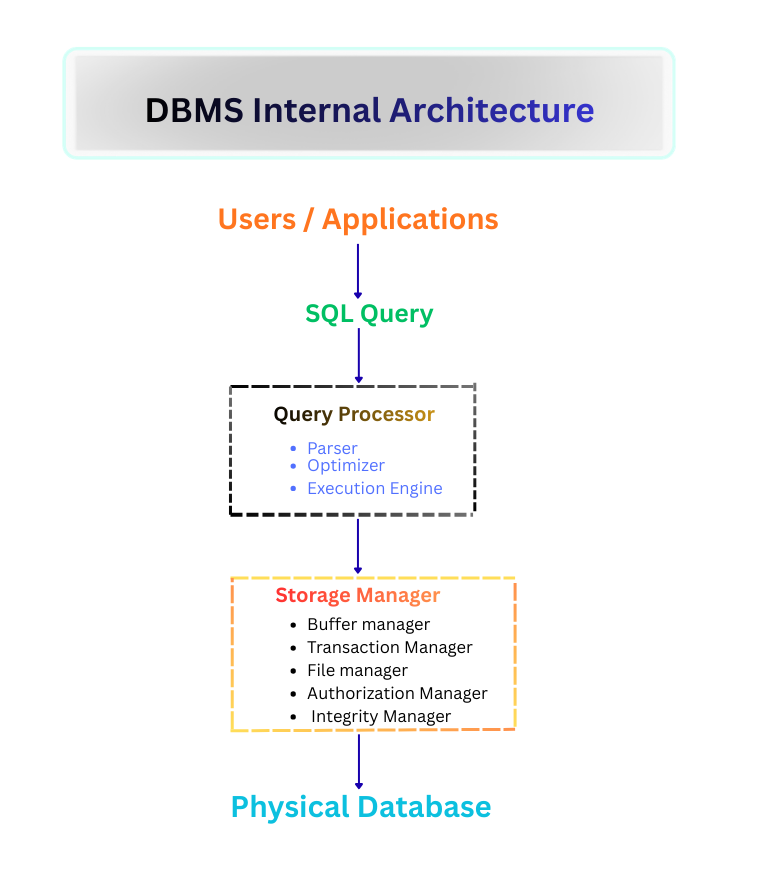
The internal architecture of a DBMS explains how database queries are processed internally. User queries are first handled by the query processor, which parses and optimizes the SQL statement. The storage manager then interacts with the database storage layer to retrieve or update the requested data efficiently.
In simple terms:
A DBMS acts like an operating system for data, managing how information is stored and accessed.
If you want to explore how DBMS systems evolved and why they replaced file systems, read:
Related Guide: Why Databases Use Tables Instead of Files for Modern Storage
3. Advantages and Disadvantages of DBMS
Understanding the strengths and limitations of DBMS helps explain why databases are widely used.
Advantages of DBMS
Reduced Data Redundancy
Data is stored in structured tables rather than repeated across files.
Improved Data Consistency
Updates occur in one place, preventing conflicting information.
Better Data Security
Database administrators can control who can read or modify data.
Efficient Data Access
Users can retrieve information quickly using queries.
Data Sharing
Multiple users can access the database simultaneously.
ACID Properties in DBMS
Modern Database Management Systems follow ACID properties to ensure reliable and consistent data transactions. ACID stands for Atomicity, Consistency, Isolation, and Durability.
- Atomicity – A transaction either completes fully or does not occur at all.
- Consistency – The database always remains in a valid state after a transaction.
- Isolation – Multiple transactions can run simultaneously without interfering with each other.
- Durability – Once a transaction is committed, the data remains stored even after system failures.
Disadvantages of DBMS
Despite its advantages, DBMS also has some limitations.
Higher Complexity
Database systems require skilled administrators and proper design.
Cost
Large enterprise database systems can be expensive.
Performance Overhead
For very small applications, a full DBMS may be unnecessary.
We discuss real-world examples of DBMS advantages and disadvantages in detail here:
→ Advantages and Disadvantages of DBMS Explained with Examples
4. Types of DBMS
Different database systems are designed for different types of data and applications.
The major types of DBMS include:
Hierarchical DBMS
Data is organized in a tree-like structure, where each record has one parent.
Used in early database systems.
Network DBMS
Data records are connected in a network structure where records can have multiple relationships.
Relational DBMS (RDBMS)
This is the most widely used type of DBMS today.
Data is organized into tables (relations) that can be linked using keys.
Most modern applications rely on relational databases.
NoSQL Databases
Designed for large-scale distributed data systems.
Common types include:
- document databases
- key-value databases
- graph databases
These are used in big data and high-scale web applications.
If you want a detailed explanation of hierarchical, network, relational, and NoSQL databases, read:
→ Types of DBMS Explained with Real-World Examples
5. DBMS Software and Real-World Examples
Many software systems implement database management technologies.
Popular DBMS software includes:
- MySQL
- PostgreSQL
- Oracle Database
- Microsoft SQL Server
- MongoDB
These databases power modern systems such as:
- banking platforms
- e-commerce websites
- enterprise software
- analytics platforms
For a deeper look at popular database systems used in industry, read:
→ Top DBMS Software Used by Modern Companies
6. Data Redundancy: The Silent Data Integrity Problem
Data redundancy occurs when the same information is stored multiple times in a database system.
Example:
A student's name appearing in:
- admission records
- exam records
- library records
If one table updates the student's name and another does not, the database becomes inconsistent.
To solve this problem, database designers use normalization, which organizes data into logical tables.
Normalization ensures:
- minimal duplication
- accurate relationships between tables
- better data integrity
To understand this concept in depth with practical examples, read:
Technical Breakdown: [What Is Data Redundancy and Why Is It Dangerous for Your Business?]
7. Who Manages a Database? (Database Users & DBA)
A database system involves several types of users.
Database Administrator (DBA)
The Database Administrator (DBA) manages the database infrastructure.
Responsibilities include:
- database security
- performance optimization
- system monitoring
- backup and recovery
The DBA ensures that the database remains reliable and secure.
If you want to explore the responsibilities and skills of a database administrator, read:
Career Insight: [What Does a Database Administrator (DBA) Actually Do? A Day in the Life]
Application Developers
Developers build software that interacts with the database using queries and APIs.
End Users
End users interact with applications such as mobile apps or websites that retrieve data from the database.
Most users never interact directly with the database itself.
8. Database Architecture: 1-Tier vs 2-Tier vs 3-Tier
Database systems evolved as applications became more complex.

Database architecture describes how applications interact with databases. Early systems used a simple architecture where the application and database ran on the same machine. As applications grew larger and required better scalability, architectures evolved into client-server systems and eventually into modern multi-tier architectures that separate user interfaces, application logic, and data storage.
1-Tier Architecture
The application and database run on the same machine.
Used in small standalone systems.
Example:
Local desktop applications.
2-Tier Architecture
The client application communicates directly with a database server.
Common in early client-server systems.
3-Tier Architecture
Modern systems use three layers:
- Presentation Layer (User Interface)
- Application Layer (Business Logic)
- Data Layer (Database)
This architecture improves:
- security
- scalability
- maintainability
Most modern web applications use this model.
For diagrams and real-world system examples, read:
Comparison Guide: [1-Tier vs 2-Tier vs 3-Tier Architecture: Which One Do You Need?]
9. Schema vs Instance Explained Clearly
Two important database concepts are schema and instance.

Schema and instance represent two fundamental concepts in database systems. The schema defines the logical structure of the database including tables, columns, relationships, and constraints. The database instance represents the actual data stored in those tables at a particular moment in time. While the schema usually changes rarely, the instance changes continuously as new records are inserted, updated, or deleted.
Database Schema
The schema defines the structure of the database.
It includes:
- tables
- columns
- relationships
- constraints
Think of the schema as the blueprint of the database.
Database Instance
The instance represents the actual data stored in the database at a given moment.
If new records are added or removed, the instance changes while the schema remains the same.
In simple terms:
Schema = structure
Instance = current data
If this concept still feels confusing, read the full guide:
Examples: [Schema vs Instance Explained with Real-World Database Examples]
10. Why Databases Use Tables (Relational Model)
Relational databases organize data into tables.
Each table represents an entity such as:
- users
- orders
- products
Tables allow databases to define relationships between data.
For example:
A User_ID can link:
- users table
- orders table
- payment table
This structure allows powerful queries and analytics.
We explain relational models and table relationships in detail here:
→ Why Databases Use Tables Instead of Files
11. What Happens When You Run a Database Query
When you execute a query like:
SELECT * FROM users;The DBMS performs several steps:
- parses the query
- checks user permissions
- generates an execution plan
- retrieves the requested data
This process is known as query processing.
Efficient query processing allows databases to retrieve data extremely quickly.
To understand how databases execute SQL queries internally, read:
Behind the Scenes: [The Life of a Query: What Happens Inside a Database When You Run a Query]
12. Primary Keys: The Unique Identity of Data
A Primary Key uniquely identifies each row in a table.
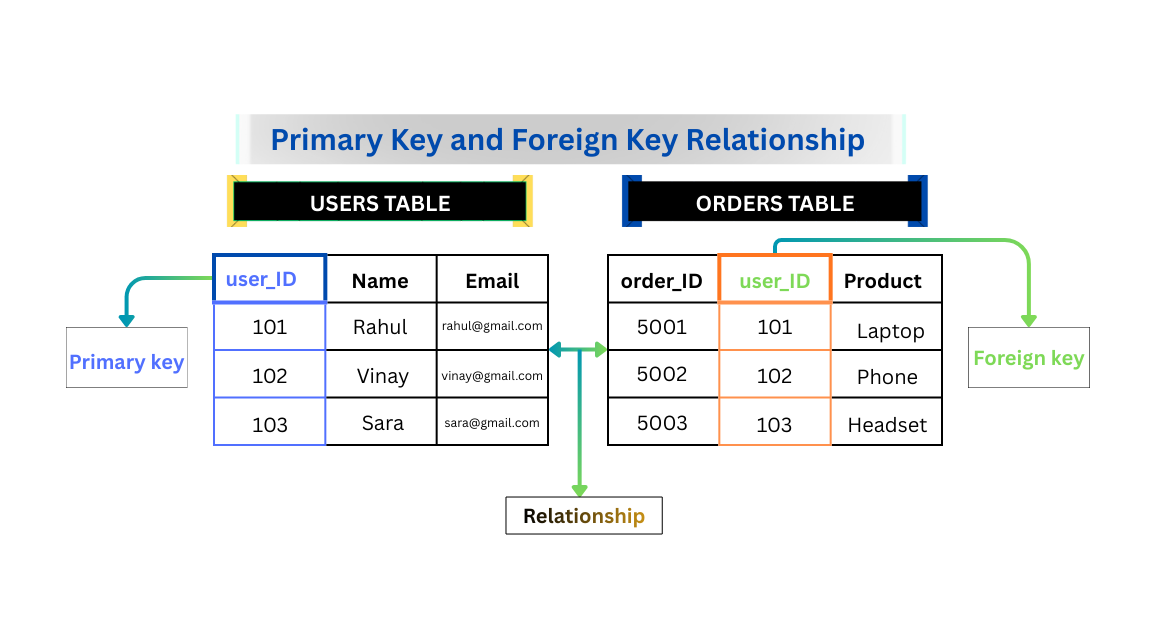
Primary keys are the foundation of relational database design. Each table contains a column whose values uniquely identify every record in that table. Other tables can reference this identifier using a foreign key, allowing databases to create relationships between related data. This relational structure enables efficient queries, consistent data relationships, and strong data integrity.
Example:
Student Table
| Student_ID | Name | |
|---|---|---|
| 101 | Rahul | rahul@email.com |
The Student_ID ensures that every record is unique.
Primary keys also help establish relationships between tables.
Without primary keys, managing relational data would become extremely difficult.
Learn more about primary keys and how they maintain data integrity here:
Concept Guide: [Why Primary Keys Exist in Databases and How to Choose One]
13. Metadata: The Intelligence Layer of Modern Databases
Metadata describes the structure and meaning of data.
Examples include:
- table definitions
- column data types
- relationships between tables
- indexes and constraints
Metadata acts as a data dictionary that explains how the database is organized.
In modern AI-driven data systems, metadata is essential because it allows automated tools to understand database structures.
Clean metadata enables:
- better analytics
- automated data pipelines
- AI-driven insights
Metadata is becoming critical for modern data systems and AI platforms. Learn more here:
Future-Proofing: [The Power of Metadata: Why It Is Critical for AI-Driven Databases]
Frequently Asked Questions About Database Management Systems (DBMS)
What is a DBMS in simple terms?
A Database Management System (DBMS) is software that allows users and applications to store, organize, manage, and retrieve data efficiently. Instead of storing information in scattered files, a DBMS keeps data in structured databases that support secure access, fast querying, and reliable data management. Popular examples of DBMS software include MySQL, PostgreSQL, Oracle Database, Microsoft SQL Server, and MongoDB.
What are the main types of DBMS?
There are four major types of Database Management Systems used in modern computing:
- Hierarchical DBMS – organizes data in a tree-like parent-child structure.
- Network DBMS – supports complex many-to-many relationships between records.
- Relational DBMS (RDBMS) – stores data in structured tables and is the most widely used database model.
- NoSQL Databases – designed for distributed systems, big data, and large-scale web applications.
What are the advantages of using a DBMS?
The main advantages of Database Management Systems include:
- Reduced data redundancy
- Improved data consistency and accuracy
- Enhanced security and access control
- Efficient data retrieval using query languages such as SQL
- Support for multi-user access and concurrent operations
These advantages make DBMS essential for modern applications such as banking systems, e-commerce platforms, and enterprise software.
How does a DBMS process a query?
When a user runs a database query such as a SQL command, the DBMS follows several internal steps:
- Parse the query to check syntax.
- Verify user permissions and access rights.
- Generate an optimized execution plan.
- Retrieve data from storage.
- Return the results to the user or application.
This process is known as query processing and allows databases to retrieve large amounts of data efficiently.
Why are databases important in modern software systems?
Databases are critical components of modern digital systems because they store and manage large volumes of structured data. Almost every application today relies on databases to store information such as user accounts, transactions, product catalogs, analytics data, and logs.
Database Management Systems ensure that data remains organized, secure, and accessible, enabling applications to scale to millions of users while maintaining data integrity and performance.
Real-World Examples of DBMS in Everyday Life
Database management systems power many systems people use every day.
Examples include:
Banking systems
Banks store customer accounts, balances, and transactions in databases to ensure accurate financial records.
E-commerce platforms
Online stores use databases to store product catalogs, customer orders, and payment information.
Social media platforms
Social media applications store user profiles, posts, comments, and connections in databases.
Streaming platforms
Movie and music platforms use databases to track viewing history and recommend personalized content.
Why Learning DBMS Is Important for Developers and Data Professionals
Understanding database fundamentals is essential for many technical roles such as:
- software developers
- data analysts
- data engineers
- backend engineers
- database administrators
Almost every modern application depends on databases to store and process information.
Learning DBMS concepts helps you understand:
- how applications manage data
- how systems scale to millions of users
- how data integrity and security are maintained
Final Thoughts
Databases form the backbone of modern digital systems.
Without them, managing the enormous volume of data generated every day would be nearly impossible.
A Database Management System (DBMS) provides the structure, control, and efficiency needed to organize data reliably.
By understanding database fundamentals—including DBMS types, advantages and disadvantages, database architecture, schema design, query processing, and metadata—you build the foundation for deeper topics such as:
- SQL optimization
- distributed databases
- cloud data platforms
- data engineering systems
Mastering these concepts is the first step toward understanding how modern applications manage data at scale.