
Let’s be honest—when most B.Tech students first enter the world of DBMS, it often feels like a sudden academic plot twist.
One day, life is normal… then boom.
ER diagrams. Relations. Normalization. SQL queries. Primary keys. Foreign keys.
And all of this is usually taught in just 3 to 4 months, while students are already juggling assignments, internals, coding labs, attendance pressure, and the timeless engineering tradition of saying:
“Bro… exam ki mundhu chusukundham.”
Because of this, many students don’t truly focus on understanding DBMS deeply in the beginning. Not because DBMS is useless—but because it often feels confusing, rushed, and disconnected from real life.
So naturally, dangerous questions start entering the mind:
- “Where will this DBMS actually be useful?”
- “Does one person really do all these DBMS jobs?”
- “Why am I drawing boxes and lines like an architect when I just wanted to pass?”
And just like that…
Instead of learning, many students become One-Day Batters—studying the night before the exam with pure luck, caffeine, and emotional support from previous year question papers.
If luck works? Pass.
If not?
Supplementary exam says hello again.
But here’s the funny truth:
DBMS is not just an exam subject. It is the silent backbone behind banking apps, Instagram, shopping websites, hospital records, railway bookings, and almost every serious software system. If you're completely new, first understand What DBMS actually is and why it exists.
But here’s the real twist: Before DBMS became the backbone of modern apps, businesses heavily depended on traditional file systems—and those systems created chaos through redundancy, inconsistency, poor security, and painful data retrieval. If you want to truly understand why DBMS roles even exist today, first explore how file systems failed and why DBMS became essential.
Who actually does what in DBMS?
Is DBMS one giant job done by one exhausted human?
Absolutely not.
Just like a movie has actors, directors, editors, and producers—DBMS also has different roles, each solving a specific problem.
And that’s exactly what this article is here to do:
No boring textbook definitions. No “mug up and forget.”
Instead, we’ll break down the Roles of DBMS step by step, in a fresher-friendly, career-focused, slightly comical way—so you can finally understand:
Who does what, why they do it, and why DBMS actually matters in the real world.
Note for One-Day Batters:
If your goal is just “some extra points to fill exam paper,” this will still help.
Note for Future Tech Builders:
If you actually want to build a career in development, data, cloud, or system design… read seriously. DBMS is one of those subjects that can quietly become your superpower later.
Yes, yes… I know the article looks longer than your semester syllabus before exams—but relax, this isn’t for mugging up overnight; it’s written so your brain finally says, “Ohhh… so that’s what DBMS actually does!”
So don’t panic-scroll like it’s a terms and conditions page—read casually, laugh a little, and by the end, even DBMS might start making sense.
Let’s begin with a flowchart that clearly explains all the working roles of DBMS.
DBMS Roles Flowchart: From User Problem to Real-World Feature
Click any role in the flowchart below to jump directly to its detailed section.
User problems & feedback
Identifies needs & defines requirements
Designs data blueprint
Builds, secures & optimizes database
Processes, stores & retrieves data
Builds real features users interact with
Fast search, smart filters, better usability
In this article, we will understand DBMS roles through the best real-world examples—such as how different DBMS roles play a major part when Instagram introduces a new feature.
END USERS:
People who use applications like Instagram, WhatsApp, Amazon, Google Pay, or Netflix to perform everyday tasks. They do not directly use technical skills like SQL, but in the backend, SQL works behind the scenes without them even realizing it.
Types of End Users and What They Do:
-
Casual End Users:
People who use applications occasionally for simple tasks like browsing Instagram, watching YouTube, booking movie tickets, or shopping on Amazon. -
Naive (Parametric) End Users:
Regular users who repeatedly perform specific tasks using predefined interfaces, like ATM users withdrawing cash, railway ticket booking users, or cashiers using billing software. -
Sophisticated End Users:
Advanced users who interact with systems more deeply, such as business analysts using dashboards, researchers accessing data platforms, or professionals using specialized software for detailed work. -
Stand-alone End Users:
Individuals who use personal database applications for their own work, like Microsoft Access, Excel databases, or personal finance management software.
When Early Instagram Made You Scroll Like an Archaeologist to Find One Old Post
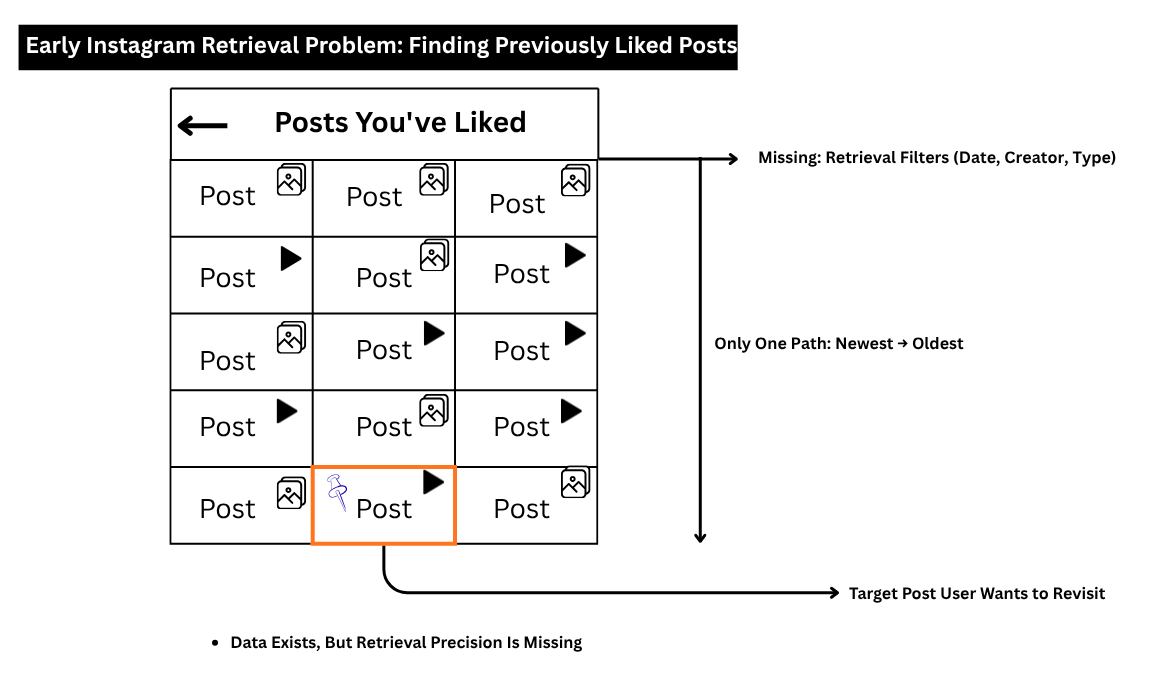
In the early days of Instagram, users could like hundreds or even thousands of posts—but revisiting one specific liked post later was surprisingly frustrating. As shown in the image, although the data was stored, retrieval precision was missing. Users only had one path: scrolling from newest to oldest through an endless list of liked posts.
This created a major usability problem:
- No filters for date
- No search by creator
- No category or content type sorting
- Just endless scrolling and hoping luck would help
Imagine trying to find one meme, reel, or saved idea from months ago—it felt less like using social media and more like searching for treasure without a map.
As user frustration grew, people gave feedback through app reviews, support requests, social media discussions, and feature suggestions—asking Instagram for smarter retrieval tools like filters, better search, and organized activity history.
This feedback highlighted an important truth in DBMS: storing data is not enough—users also need efficient retrieval.
Data Storing:
Data storing means safely saving information in a database so it can be used later—for example, Instagram storing every post you like.
Data Retrieval:
Data retrieval means quickly finding and accessing the saved information when needed—for example, finding a specific liked post from last year.
SYSTEM ANALYST:
A System Analyst studies business needs and defines what a system must do to solve real-world problems.
1) Where They Work:
At the business problem level (before technical DBMS design begins).
They interact with:
- Clients
- Managers
- End Users
2) What They Do:
- Gather requirements
- Understand business rules and workflows
- Identify what data needs to be stored
- Decide what features the system must have
- Convert business problems into system solutions
3) What They Use:
- Requirement documents
- Business rules
- Flow diagrams
- Use-case diagrams
In simple words:
The System Analyst acts like a bridge between business needs and technical development. They don’t directly build the database, but they help define what should be built.
How Instagram’s System Analysts Turned User Frustration into Smarter Features
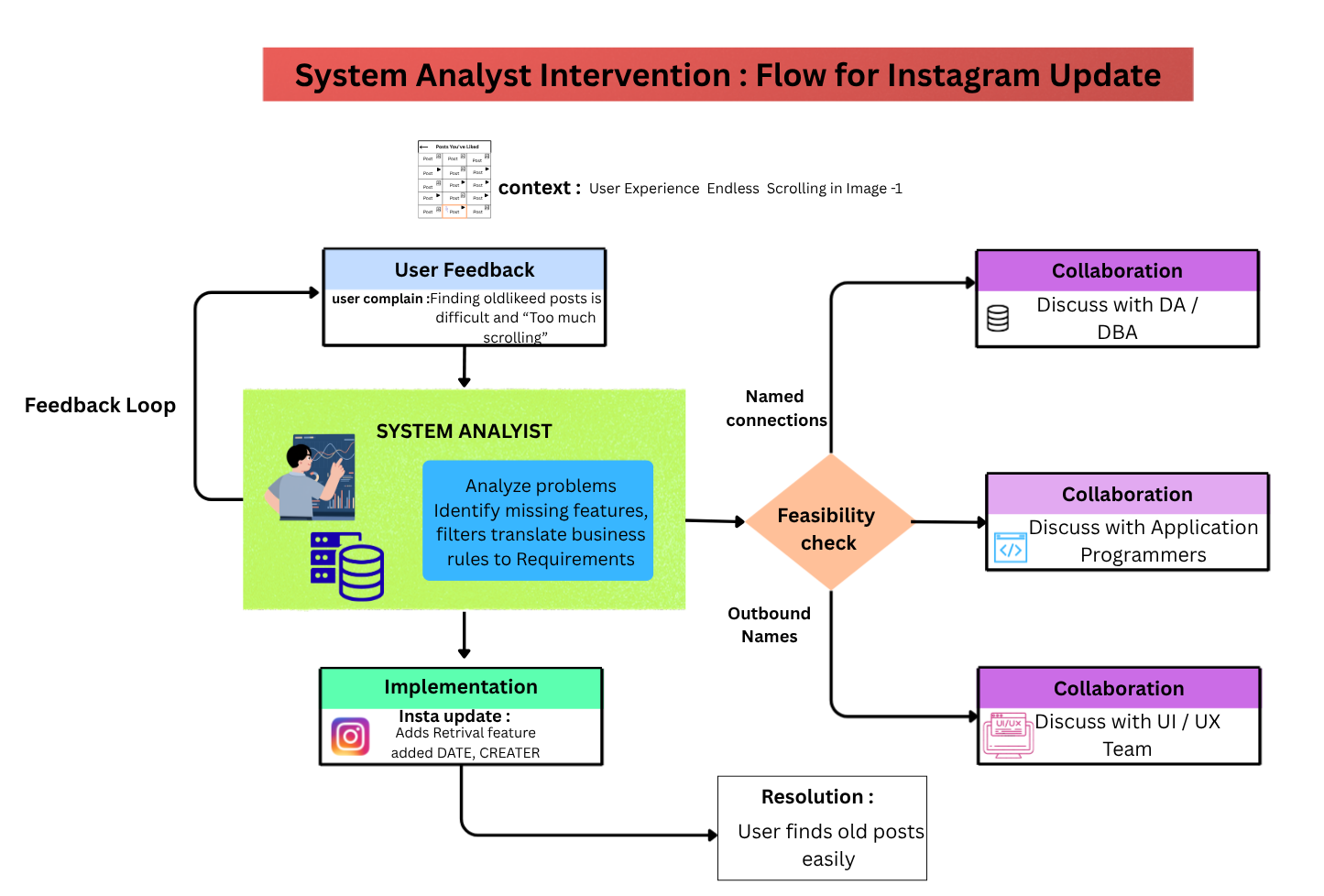
When users struggled to find old liked posts and repeatedly gave feedback, Instagram’s System Analysts stepped in to study the real problem behind the frustration. Their job was not to directly code the solution, but to deeply understand what users actually needed—such as better search, filters, creator-based sorting, or faster retrieval options.
They analyzed user complaints, business goals, and platform limitations to define clear system requirements like:
- What new features users need
- What data should be organized better
- How retrieval should become faster and smarter
To make these improvements possible, System Analysts regularly collaborated with:
- End Users – to understand pain points
- Managers / Product Teams – to align with business goals
- Database Administrators (DBA) / Database Architects (DA) – to discuss data structure, storage, and retrieval improvements
- Developers / UI Teams – to help transform requirements into actual features
In simple terms, they acted like problem-solvers who converted user complaints into a structured blueprint for Instagram’s future updates.
System Analyst Salary in the AI Era (Important Reality)
In today’s AI-driven world, System Analysts are still highly valuable—but now companies prefer analysts who can combine business understanding + data + technology + AI awareness.
Salary in India (Approximate):
- Fresher / Entry Level (0–2 years): ₹3–7 LPA depending on skills, domain, and company (Amity Online)
- Mid-Level (3–6 years): ₹8–12 LPA (Business Analysis Blog)
- Senior / Specialized Roles: ₹12–18+ LPA, especially in banking, ERP, cloud, or enterprise systems (Amity Online)
AI Era Truth:
AI may automate basic documentation or repetitive analysis, but companies still need System Analysts for:
- Understanding business problems
- Designing smarter workflows
- Translating client needs into technical systems
- Coordinating between humans, developers, and AI tools
Simple truth:
AI can assist analysis… but understanding real business problems is still a human strength.
What to Study to Become a System Analyst:
- DBMS basics (ER diagrams, SQL, data flow)
- Business Analysis
- System Design concepts
- Flowcharts & Use-Case Diagrams
- Software Development Life Cycle (SDLC)
- Excel / Power BI / Basic Data Analysis
- Communication & Problem-Solving
- Basic understanding of AI tools and automation
Best Degree Paths:
- B.Tech (CSE / IT)
- BCA / MCA
- Business Analytics
- Certifications like CBAP, SQL, Agile, or Data Analysis
In simple words:
A modern System Analyst is like a translator between business goals and technology solutions—and in the AI era, those who understand both sides can grow fast.
DA (Database Designer / Architect):
1) Who They Are:
They convert system requirements into a proper database design structure.
2) Where They Work:
At the design stage, before the actual database is built.
3) What They Do:
- Identify entities (tables)
- Define attributes (columns)
- Define relationships between data
- Set keys and constraints
- Normalize the design for efficiency and reduced redundancy
4) What They Use:
- ER Diagrams
- Schema Diagrams
- Data Modeling Tools
In simple words:
The Database Designer / Architect acts like the blueprint creator of the database—deciding how data should be organized before developers or DBAs start building and managing it.
How Instagram’s Database Architects Turned System Plans into a Smart Data Blueprint
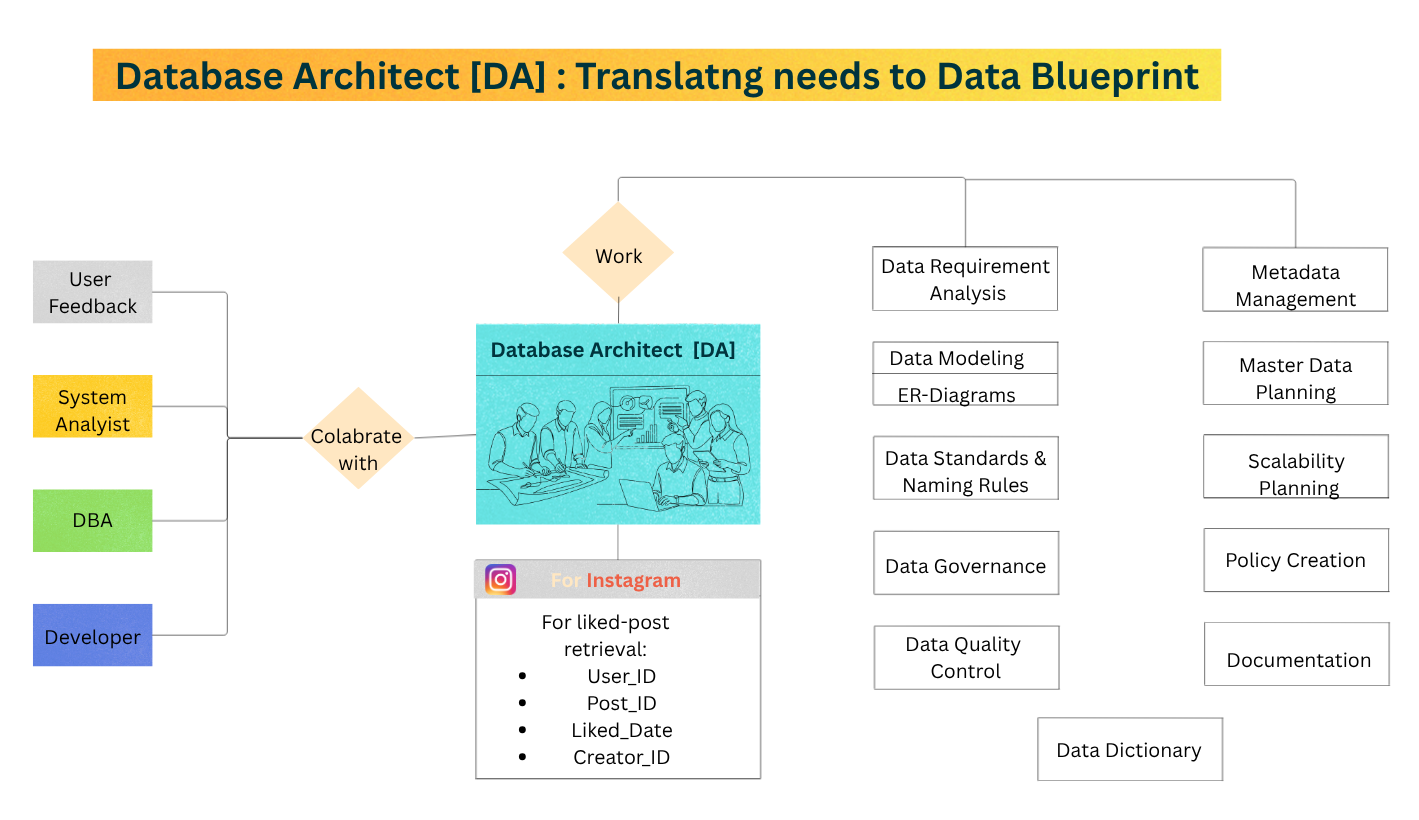
Once Instagram’s System Analysts clearly identified user needs—like better search, filters, and faster liked-post retrieval—the Database Designer / Architect (DA) stepped in to transform those requirements into a powerful database structure.
Their job was to design how Instagram’s data should be organized behind the scenes so new features could work smoothly and efficiently. They decided:
- What new tables or entities were needed
- Which attributes (date, creator, content type) should be stored
- How posts, likes, users, and filters should connect
- What keys, constraints, and normalization methods would improve speed and reduce redundancy
To keep the design accurate and practical, Database Architects regularly collaborated with:
- System Analysts – to understand exact business and feature requirements
- DBA (Database Administrator) – to ensure performance, scalability, and maintainability
- Developers – to support feature integration with application logic
- Product / Management Teams – to align with platform goals
In simple terms, while the System Analyst defines what Instagram needs, the Database Architect designs how the data structure should be built to make those needs possible.
Database Architect (DA) Salary in the AI Era (Important Reality)
In the AI era, Database Architects are becoming more valuable, not less—because AI systems, cloud platforms, analytics, and large apps still depend on well-structured, scalable, secure data architecture.
Salary in India (Approximate):
- Entry Level / Junior (after strong DB + design skills): ₹8–15 LPA depending on company and skills (Intellipaat)
- Mid-Level (4–8 years): ₹18–30 LPA is common for experienced database/data architects (Glassdoor)
- Senior / Enterprise Architect: ₹30–50+ LPA, especially in cloud, enterprise systems, fintech, or large-scale platforms (Glassdoor)
AI Era Truth:
AI can help automate some schema suggestions or optimization ideas, but companies still need Database Architects for:
- Designing scalable database blueprints
- Structuring data for AI/analytics systems
- Cloud database architecture
- Performance and normalization strategy
- Security + governance
Simple truth:
AI can assist with design… but human architects decide the best long-term structure.
What to Study to Become a Database Architect:
Core Foundation:
- DBMS deeply (ER diagrams, normalization, schema design)
- SQL (Advanced)
- Data Modeling
- System Design
- Database Security
- Indexing & Performance Basics
Modern AI/Cloud Edge:
- Cloud Databases (AWS, Azure, GCP)
- NoSQL + Distributed Databases
- Data Warehousing
- Basic Python / Data Engineering awareness
Useful Tools:
- MySQL / PostgreSQL / Oracle
- ER modeling tools
- Schema design platforms
Best Degree Paths:
- B.Tech (CSE / IT)
- BCA / MCA
- Data Engineering / Cloud certifications
- SQL + Cloud + Architecture certifications
In simple words:
A Database Architect is the person who designs the “data city map” before companies build giant apps, cloud systems, or AI platforms on top of it. In the AI era, those who understand both database design + cloud + scale can become extremely valuable.
DBA (Database Administrator)
1) Who They Are:
Responsible for implementing, managing, securing, and maintaining databases inside the actual DBMS.
2) Where They Work:
- Inside the DBMS environment
- After database design is completed
3) What They Do:
- Create databases and tables
- Implement constraints, indexes, and schemas
- Manage users, roles, and permissions
- Backup and recovery
- Performance tuning and optimization
- Monitor database health
- Ensure security, reliability, and availability
- Manage system catalog / metadata configurations
4) What They Use:
- SQL (DDL, DCL, sometimes TCL)
- DBMS software (MySQL, PostgreSQL, Oracle, SQL Server, etc.)
- Monitoring and backup tools
Simple Real-World Difference:
System Analyst:
“What system is needed?”
Database Architect:
“How should data be designed?”
DBA:
“How do we build, secure, run, and protect it efficiently?”
In simple words:
The DBA (Database Administrator) acts like the database manager and protector—building, maintaining, securing, and optimizing the database so it runs smoothly, safely, and efficiently in real-world use.
How Instagram’s DBA Turned Smart Database Designs into a Fast, Secure, Real-World System
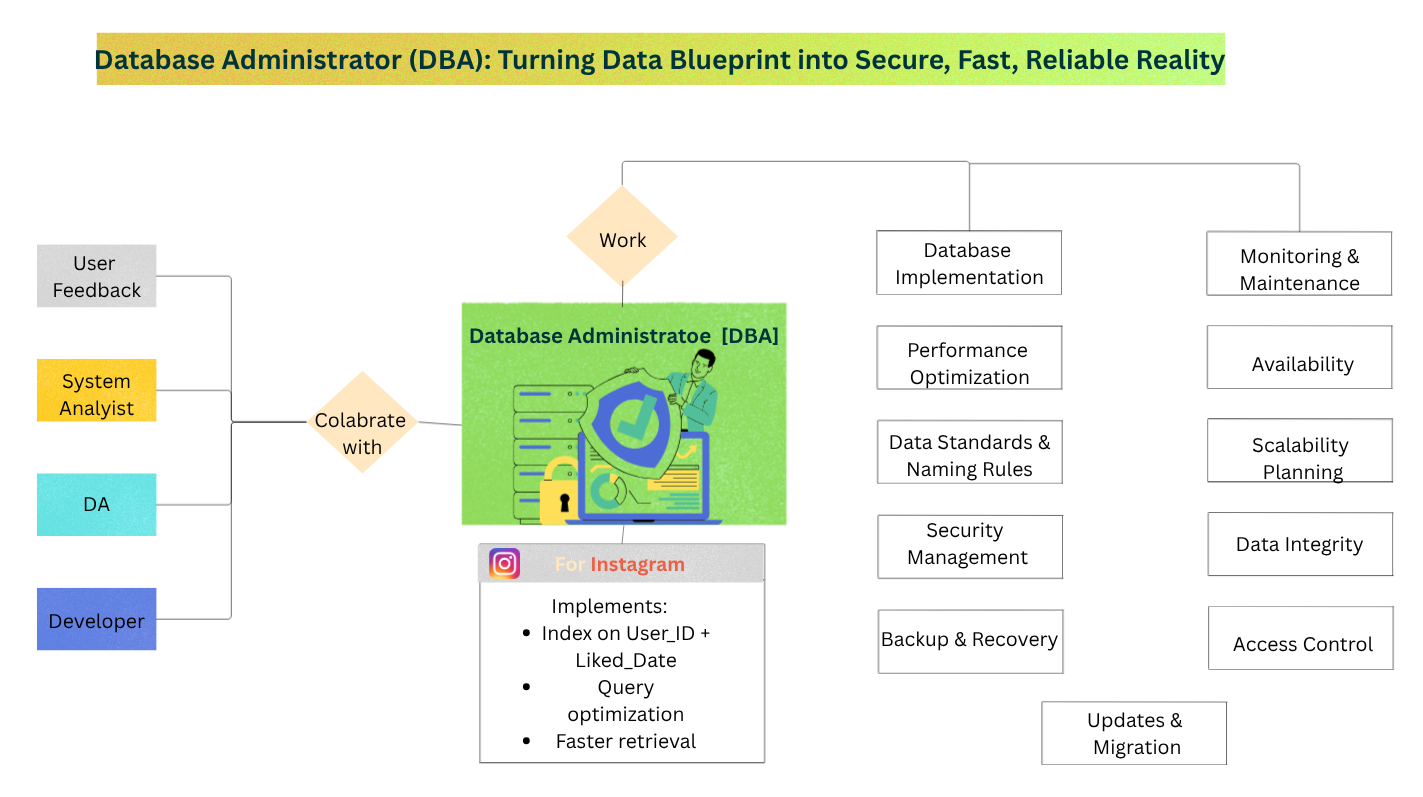
Once Instagram’s System Analysts defined user needs and Database Architects designed the perfect data blueprint, the Database Administrator (DBA) stepped in to make that design actually work inside the real DBMS environment.
Their job was to transform the database plan into a secure, optimized, and fully functional system that could handle millions of users efficiently. They worked on:
- Creating actual databases, tables, and indexes
- Implementing keys, constraints, and permissions
- Managing user access and security
- Optimizing retrieval speed for search and filters
- Handling backup, recovery, and system reliability
- Monitoring performance so Instagram stays fast even at scale
To keep everything accurate and efficient, DBAs regularly collaborated with:
- System Analysts – to understand system goals and feature purpose
- Database Architects (DA) – to correctly implement the designed schema
- Developers – to support APIs, feature integration, and query efficiency
- Security / Product Teams – to maintain safety, scalability, and user trust
In simple terms, while the System Analyst defines what is needed, and the Database Architect designs how data should be structured, the DBA ensures the entire database actually works smoothly, securely, and efficiently in the real world.
DBA (Database Administrator) Salary in the AI Era (Important Reality)
In today’s AI-driven world, DBAs are still highly important because every major platform—banking, healthcare, cloud apps, e-commerce, and AI systems—needs databases that are secure, reliable, fast, and always available.
Salary in India (Approximate):
- Fresher / Junior DBA (0–2 years): ₹4–8 LPA depending on SQL, DBMS, and company type
- Mid-Level DBA (3–6 years): ₹8–15 LPA with performance tuning, backup, and security skills
- Senior DBA / Cloud DBA: ₹15–30+ LPA, especially in cloud, enterprise, fintech, or large-scale systems
AI Era Truth:
AI can automate some monitoring, alerts, or optimization suggestions—but companies still need DBAs for:
- Database security
- Backup & disaster recovery
- User access control
- Performance tuning
- High availability
- Cloud database management
Simple truth:
AI can assist management… but DBAs keep mission-critical systems running safely.
What to Study to Become a DBA:
Core Foundation:
- DBMS fundamentals
- SQL (DDL, DCL, TCL)
- Database installation & configuration
- Backup and recovery
- User roles & permissions
- Performance tuning
- Indexing
Modern Advantage:
- Cloud databases (AWS RDS, Azure SQL, Google Cloud SQL)
- Linux basics
- Scripting (Python / Shell)
- Security fundamentals
- Monitoring tools
Common DBMS Platforms:
- MySQL
- PostgreSQL
- Oracle
- SQL Server
Best Degree Paths:
- B.Tech (CSE / IT)
- BCA / MCA
- Database Administration certifications
- SQL + Cloud + Security certifications
In simple words:
A DBA is like the operational guardian of the database—making sure the system is secure, fast, recoverable, and running smoothly every day, even in the AI era.
DA vs DBA: Simple Difference
DA (Data Administrator) and DBA (Database Administrator) both work with data, but their roles are different.
| Category | DA (Data Administrator) | DBA (Database Administrator) |
|---|---|---|
| Main Focus | Plans data structure | Builds and manages database |
| Core Work | Creates ER diagrams | Creates tables and indexes |
| Standards | Defines data standards | Optimizes speed and performance |
| Priority | Focuses on data governance | Focuses on security and backups |
| Decision Role | Decides what data is needed | Decides how data is stored |
| Role Type | Strategic role | Technical role |
Simple Example (Instagram):
| Role | Instagram Example |
|---|---|
| DA | Decides system needs User_ID, Post_ID, Liked_Date |
| DBA | Creates database tables, indexes, and fast retrieval system |
Easy Analogy:
| DA | DBA |
|---|---|
| Architect (designs blueprint) | Engineer (builds and maintains it) |
Final:
DA designs the data plan, DBA makes it work efficiently.
DBMS: What It Does Internally When a DBA Executes Commands
1) Query Processor:
- Parses and checks SQL commands
- Validates syntax and permissions
- Optimizes execution
- Passes instructions to storage systems
2) Metadata Manager:
- Stores database structure in system catalog
- Table names, columns, keys, constraints
- Maintains schema definitions
3) Storage Manager:
- Creates physical storage structures
- Manages files, records, indexes, and disk space (working closely with the Operating System for physical storage management)
4) Transaction Manager:
- Handles concurrency
- Maintains data integrity
- Manages COMMIT / ROLLBACK
5) Recovery Manager:
- Backup and recovery
- Crash protection
- Log management
In Simple Words:
When a DBA gives instructions, the DBMS acts like an internal operations factory—understanding commands, checking rules, storing data properly, protecting integrity, and making sure everything runs safely.
Golden Understanding:
DBA = Manager
DBMS = Internal execution machine.
How Instagram’s DBMS Became the Silent Engine Behind Faster Search, Smart Filters, and Smooth User Experience
Once System Analysts identified user problems, Database Architects designed the data blueprint, and DBAs implemented the system, the DBMS itself became the powerful internal engine that made everything actually work behind the scenes.
Its job was not just to store Instagram’s massive data—but to intelligently process, organize, secure, and retrieve it efficiently whenever users searched for old liked posts, applied filters, or interacted with new features.
Inside Instagram’s DBMS, it worked by:
- Processing SQL and system commands through the Query Processor
- Managing schema, metadata, and system catalog structures
- Creating and organizing storage for posts, likes, users, and indexes
- Handling concurrency for millions of users at once
- Protecting data integrity, permissions, backup, and recovery
- Optimizing speed so search and retrieval feel instant
To make every update successful, DBMS improvements were shaped through collaboration with:
- System Analysts – define user needs and business goals
- Database Architects (DA) – design data structure and relationships
- DBAs – implement, secure, and optimize the system
- Developers – build features and efficient queries
- Security Teams – protect trust, privacy, and reliability
In simple terms, while other roles plan and build the system, the DBMS acts like Instagram’s invisible execution engine—quietly turning all those plans into a fast, secure, and scalable real-world experience for millions of users.
Application Programmers
1) Who They Are:
People who build applications, websites, or software systems that use databases.
2) Where They Work:
- Application Layer
- Between end users and DBMS
3) What They Do:
- Write programs that connect to databases
- Build forms, screens, websites, and APIs
- Send and receive database queries
- Apply business logic
- Display data to end users
- Improve user experience and functionality
4) What They Use:
Programming Languages:
- Python, Java, JavaScript, C#, PHP, etc.
- SQL
Database Drivers / APIs:
- JDBC, ODBC, ORM tools, REST APIs
In Simple Words:
Application Programmers act like the bridge builders between users and databases—creating the apps people use daily while making sure database power becomes useful in real-world features.
Golden Understanding:
End User = Uses app
Application Programmer = Builds app
People who build applications, websites, or software systems that use databases. In modern apps, this often also depends on Computer Networks so users, servers, APIs, and databases can communicate globally.
DBMS = Powers data behind app.
How Instagram’s Application Programmers Turned Powerful Database Systems into Real Features Users Could Actually Touch
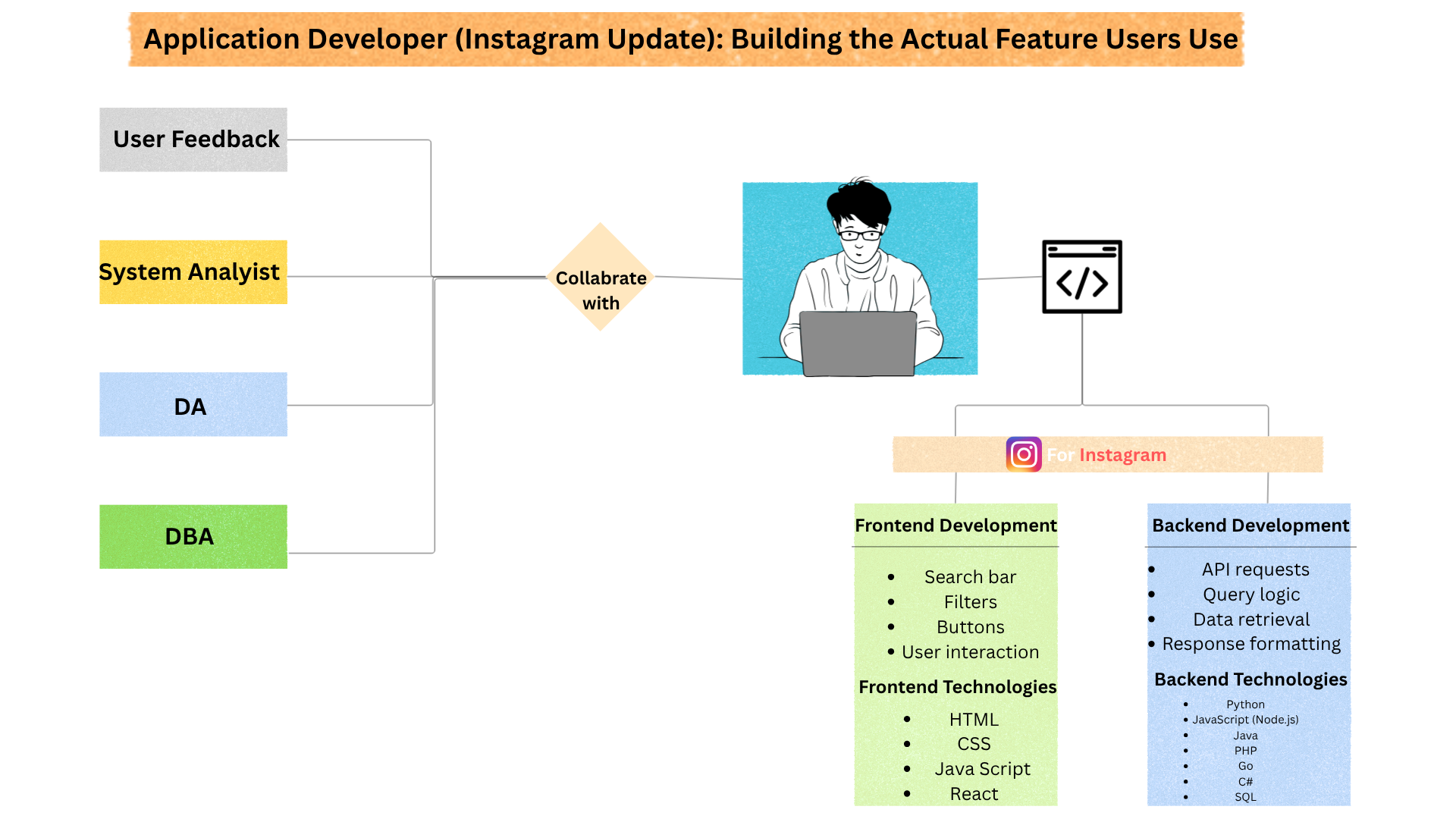
After System Analysts identified user needs, Database Architects designed the structure, DBAs built and optimized the database, and the DBMS handled internal execution, Application Programmers became the creators who transformed all that backend power into actual Instagram features users could see and use.
Their job was to build the real application layer—the screens, buttons, APIs, and logic that connected users to Instagram’s database smoothly. They worked on:
- Building search bars, liked-post filters, and user-friendly screens
- Writing application code that connects Instagram to the DBMS
- Sending SQL queries through APIs and database drivers
- Applying business logic like search behavior, sorting, and feature flow
- Handling validation, security, and smooth user interaction
- Making complex database power feel simple for end users
To make updates successful, Application Programmers regularly collaborated with:
- System Analysts – to understand feature goals and user needs
- Database Architects (DA) – to understand data structure and schema
- DBAs – to ensure query efficiency, permissions, and performance
- DBMS/Internal Systems – to retrieve and process data correctly
- UI/UX Teams – to create clean, user-friendly interfaces
- Security Teams – to protect users and prevent vulnerabilities
In simple terms, while other roles design, organize, and manage the database, Application Programmers turn all that technical power into real Instagram experiences—making features like search, filters, and smooth interaction possible for millions of users.
Application Programmer Salary in the AI Era (Important Reality)
In today’s AI era, Application Programmers remain extremely valuable because businesses still need real apps, websites, APIs, dashboards, and software systems that users actually interact with.
AI can help write code faster—but companies still need programmers who understand:
- Real-world problem solving
- Application architecture
- Database integration
- Security
- User experience
Salary in India (Approximate):
- Fresher / Junior Developer (0–2 years): ₹4–10 LPA depending on skills, stack, and company
- Mid-Level Application Developer (3–6 years): ₹10–25 LPA
- Senior / Full Stack / Product Engineers: ₹25–50+ LPA, especially in product companies, SaaS, fintech, or AI platforms
AI Era Truth:
AI tools can generate code snippets, suggest fixes, or speed up development—but programmers are still needed for:
- Building real applications
- API integration
- Business logic
- Database connectivity
- Security
- Debugging
- Product-level thinking
Simple truth:
AI can assist coding… but skilled developers build real products.
What to Study to Become an Application Programmer:
Core Foundation:
Programming languages:
- Python, Java, JavaScript, C#, or PHP
- DBMS + SQL
- Data Structures & Algorithms
- OOP (Object-Oriented Programming)
- APIs & Backend Logic
- Frontend basics (HTML, CSS, JavaScript)
Important Modern Skills:
Frameworks:
- React, Node.js, Django, Spring Boot, .NET, etc.
- Git & GitHub
- Cloud basics
- Security fundamentals
- Testing & debugging
Best Degree Paths:
- B.Tech (CSE / IT)
- BCA / MCA
- Full Stack / Software Development certifications
- Project-based learning
Best Career Tip:
Build Projects:
Instagram clone, task manager, e-commerce app, portfolio API, dashboard tools
Because companies trust skills + projects more than theory alone.
In simple words:
Application Programmers are the builders who turn ideas, databases, and system designs into real apps people use daily—and in the AI era, those who can build useful products remain highly valuable.
Upgraded User Experience : How Users Felt After Instagram’s Smart Retrieval Upgrade
Once Instagram upgraded its system with better search, filters, faster retrieval, and smarter database organization, the user experience changed dramatically.
What once felt like endless digital archaeology suddenly became fast, simple, and satisfying.
Instead of scrolling endlessly through hundreds or thousands of liked posts, users could now quickly find exactly what they wanted through smarter retrieval tools.
For users, the upgrade felt like this:
- Finding old liked posts became faster instead of frustrating
- Date filters made it easier to revisit content from specific time periods
- Creator-based search helped users find posts from favorite accounts instantly
- Better organization reduced time waste
- Smoother navigation improved overall user satisfaction
- The app felt smarter, more personalized, and more user-friendly
Emotionally, many users moved from:
Before Upgrade:
“Why is this so hard?”
“I know I liked it… but where is it?”
“Too much scrolling…”
After Upgrade:
“Oh, this is easy now.”
“Found it instantly.”
“Instagram finally understands what I need.”
This improvement did more than just save time—it increased trust.
When users feel that an application understands their problems and solves them intelligently, they are more likely to:
- Use the platform more often
- Stay engaged longer
- Trust future updates
- Feel satisfied with the product experience
Real DBMS Truth:
Users may never see the System Analyst, DA, DBA, DBMS, or Application Programmer behind the scenes—but they directly feel the quality of their work through speed, convenience, and experience.
Simple truth:
When DBMS roles work properly together, users don’t notice the complexity… they simply feel that the app “just works.”
Final User Experience:
Instagram changed from “scroll and struggle” to “search and succeed.”
🏆 Complete DBMS Role Chain in One Line (The Full Real-World Workflow)
End User feels a problem → System Analyst defines the problem → Database Architect (DA) designs the data blueprint → DBA builds, secures, and optimizes it → DBMS internally executes it → Application Programmer turns it into real features → End User experiences the upgraded solution.
In simple words:
User pain becomes business understanding, business understanding becomes database design, database design becomes secure implementation, implementation becomes system execution, and execution becomes real user experience.
📘 Final DBMS Roles Summary Table (Revision Goldmine)
| Role | Main Job | Instagram Example |
|---|---|---|
| End User | Uses the application and experiences problems or satisfaction | User struggles to find an old liked post and gives feedback |
| System Analyst | Identifies business needs and defines system requirements | Analyzes user frustration and defines need for filters/search |
| Database Architect (DA) | Designs database structure, schema, and relationships | Plans liked-post tables, date filters, creator indexing |
| DBA | Builds, secures, optimizes, and maintains database | Creates indexes, permissions, backup systems, performance tuning |
| DBMS Internal System | Processes queries, stores data, handles concurrency, recovery | Runs search queries, retrieves liked posts quickly, protects integrity |
| Application Programmer | Builds user-facing apps, APIs, screens, and logic | Creates search bar, liked-post filter UI, retrieval experience |
| Final User Experience | Feels the final result of all DBMS roles working together | User instantly finds old liked posts with smart filters |
Golden Truth:
DBMS is not one job—it is a complete chain where every role transforms user problems into scalable real-world solutions.
Ultimate Fresher Understanding:
DBMS is not just about databases… it is about solving real human problems through structured systems.
🔎 People Also Search For (DBMS Roles Beginner Confusion Solved)
A role in DBMS refers to the specific responsibility different people or system components perform—such as End Users, System Analysts, Database Architects (DA), DBAs, DBMS internal systems, and Application Programmers—to design, manage, secure, and use databases effectively.
DBMS acts like the internal execution engine that stores, organizes, secures, processes, and retrieves data while managing concurrency, backup, recovery, and performance.
No. DBMS involves multiple specialized roles like System Analyst, DA, DBA, DBMS internal systems, and Application Programmers. Each role solves a different part of the system.
DA (Database Architect): Designs the blueprint—tables, relationships, structure.
DBA (Database Administrator): Builds, secures, manages, and optimizes the real database system.
Simple truth: DA plans it, DBA runs it.
DBMS users include Casual Users, Naive Users, Sophisticated Users, Stand-alone Users, System Analysts, Database Designers, DBAs, and Application Programmers.
Privileges are permissions that control what users can do, such as SELECT, INSERT, UPDATE, DELETE, CREATE, ALTER, and ADMIN access.
Application Programmers build apps, websites, forms, APIs, and interfaces that connect users to the database—turning technical database systems into real-world usable products.
A System Analyst studies business problems, gathers user needs, defines system goals, and converts business challenges into technical requirements for developers and database teams.
DBMS powers real-world systems like banking apps, Instagram, Amazon, hospitals, railway booking, and cloud platforms by ensuring secure, organized, and scalable data management.
Absolutely yes. AI, cloud platforms, analytics, fintech, and enterprise software all depend on secure, scalable, and well-structured databases. AI may assist some tasks, but strong DBMS roles remain essential.
🎯 Final Wrap-Up: What You’ve Completely Covered in This Article
By reaching this point, you’ve gone far beyond just memorizing textbook definitions—you’ve built a real-world understanding of how DBMS actually works through people, systems, and practical product development.
In this complete guide, you explored:
- Roles of DBMS – understanding who actually does what
- DBMS Users – from End Users to technical professionals
- DBMS Roles with Real-World Examples – using Instagram’s feature evolution
- Database Administrator (DBA) Role – implementation, security, optimization, and maintenance
- System Analyst in DBMS – defining business needs and solving user pain points
- Database Architect vs DBA – blueprint design vs real-world database execution
- Application Programmer in DBMS – transforming backend systems into user-facing features
Simple truth:
You didn’t just study DBMS… you understood how modern systems transform user problems into real solutions.
Final Golden Line:
When someone asks, “Why are we even learning DBMS roles?” — you now know the answer:
Because every powerful app, platform, and digital system depends on these roles working together.
📚 Build Your Full Computer Science Foundation:
- 🗄️ Database Management Systems (DBMS) — Learn data, databases, SQL, and real-world system design.
- 💻 Operating Systems (OS) — Understand how computers manage memory, processes, files, and performance.
- 🌐 Computer Networks (CN) — Explore how devices connect, communicate, and power the internet.